
Histogrammer
A Windows luminance scope for checking images on screen.
Histogrammer gives artists a quick, consistent read on exposure while working with renders and shots. Select part of the screen to see its luminance distribution, clipping, tone balance, and distance from a pinned reference.
Portable Windows build. No installer or account.

What it does
Histogrammer samples the selected screen region using Rec.709 display luminance. It is useful for comparing shots and spotting exposure or clipping problems, but it is not a replacement for a calibrated grading monitor or your own judgement.
- Draw a region around any image on screen
- View its live luminance distribution from 0 to 100 IRE
- Check exposure, contrast, shadow clipping, and highlight clipping
- Compare the current sample with a pinned reference
- Read the balance of blacks, shadows, mids, highs, and whites
- Use Guide Mode for a short reading of the measurements
- Write, save, and export review notes
Features
ROI Capture
Draw a box around the image or UI area you want to sample.
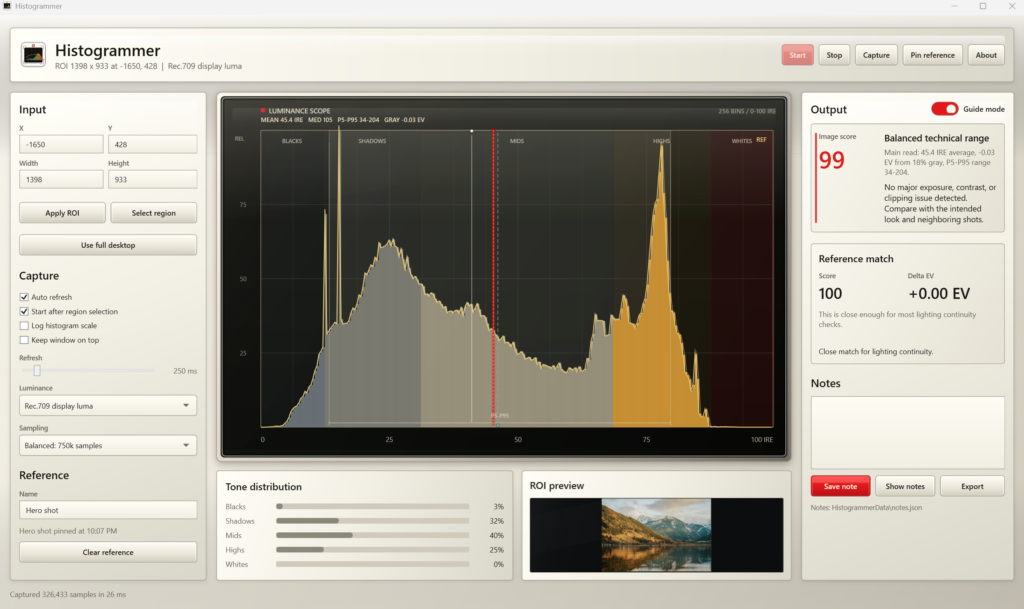
Drag a box around the area you want to measure, or press Escape to cancel. If you need it exact, type the position and size in instead. You can also measure the whole desktop, though a smaller area is faster and more precise.
Several monitors work properly, including screens above or to the left of your main one. Readings refresh as fast as 33 milliseconds, or as slowly as 2 seconds. If a capture takes longer than that, it skips one rather than falling behind. Keep the window on top and it stays visible over whatever you’re working in.
Luminance Scope
View the luminance distribution from 0 to 100 IRE.
Dark on the left, bright on the right. The height of each bar shows how much of your selection sits at that brightness. Red marks the average, the dashed line is 18% gray, and the bracket covers the range most of the image falls into.
Underneath, five bands show the percentage landing in blacks, shadows, midtones, highlights and whites. A log scale makes faint detail easier to see without changing any of the numbers. Measure with Rec.709 luma, which matches what you see on screen, or linear sRGB for technical work.
Image Score
See a compact summary of exposure, contrast, and clipping.
One number from 0 to 100, built from four things: clipping, exposure, contrast, and how the tones are spread out. It comes with a plain verdict, from “excellent technical signal” down to “high technical risk”.
The numbers behind it sit alongside — average and median brightness, contrast span, IRE, how far you are from 18% gray in stops, and how much is clipping at each end. It reads technical quality only. Not composition, story or taste.
Guide Mode
Add a short reading of what the current measurements suggest.
Leave Guide Mode on and you get one clear instruction: whatever matters most right now, whether that’s exposure, clipping, contrast or matching a reference.
Turn it off and the same panel opens up into the full picture — all four parts of the score, a short diagnosis, and specific warnings about anything likely to cause trouble later in grading, lighting continuity or shot matching.
Reference Match
Pin one sample, then compare another against its luminance statistics.
Pin a reading you want to match: a hero frame, an approved grade, a plate, a client pick. Everything you measure afterwards is compared against it.
You get a match score out of 100, how far apart the two are in stops, and how their brightness and contrast differ. It also suggests what to do — lift, pull, compress, add contrast, or watch the clipping. Clearing the reference resets the score and leaves your notes alone.
Notes
Write and export notes while reviewing images.
A note is saved with everything around it: the region, the score, the measurements, the reference name and the time. So it still makes sense weeks later.
Saved notes can be reopened and exported as CSV. The current region can go out as a PNG alongside a CSV of the full measurements. Portable copies keep everything in a folder next to the program, so nothing is scattered around your machine.
Guide Mode
Guide Mode translates the current measurements into a short note, such as whether exposure is low, highlights are clipping, or the shot is already in a workable range. It is a second opinion for render checks and shot matching, not an automatic grade.
How to use
- Open Histogrammer and select the screen region you want to check.
- Start live capture or take a single sample.
- Read the scope, tone distribution, and clipping indicators.
- Pin a reference when you need to compare another shot.
- Save or export notes as you review.
Purpose
I wanted a compact desktop scope to keep beside a render or reference, with enough context to make comparisons faster.
It supports visual judgement; it does not replace it.
Download
The current build is portable for Windows. Extract it to its own folder and run Histogrammer.exe. No installer or account.
Specifications
- Platform
- Windows. Portable — extract and run, with no installer and no account.
- Sampling
- Fast 250k, Balanced 750k, Fine 2M, or Exact — every pixel.
- Refresh
- 33 milliseconds to 2 seconds, with overlapping captures skipped.
- Luminance
- Rec.709 display luma or linear sRGB.
- Histogram
- 256 bins, with optional log scaling for display.
- Export
- PNG region preview plus CSV containing the metrics and all 256 bins.
- Notes
- Stored beside the executable in a HistogrammerData folder.
- Displays
- Any region, or the full virtual desktop; multi-monitor aware.
Notes and exports are saved in the app folder.